Navigation Computer - Establish Orbit
The Navigation Computer system provides an automated procedure to establish an orbit around a celestial object.
 The orbit velocity and the distance to the object depends on several factors, for example the mass of the object and
the gravitational pull.
The orbit velocity and the distance to the object depends on several factors, for example the mass of the object and
the gravitational pull.
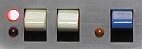
The 'Establish Orbit" procedure is initiated by pushing the blue Establish Orbit Request toggle button.
The Establish Orbit Request toggle button is located on the right-hand side console, bottom section. Left of it are
the white switch and button for velocity control, right of it is the red "Evasive Tactics" switch.

The yellow Establish Orbit indicator left of the Establish Orbit Request toggle button flashes to indicate the
"establish orbit" procedure is initiated.
The Navigation Computer first checks if the current velocity is not exceeding a certain value that makes the request
impossible to execute. An example of a message in the status line of the Navigation Screen is "orbit request
denied: velocity too high".
Of course, there must be an object in the vicinity of the Star Ship otherwise the
message "no celestial object within orbiting range" is given.
When all conditions are met, the Navigation Computer makes the following adjustments.
- The course heading follows the orbit trajectory calculated to stay in orbit.
- The velocity of the Star Ship is adjusted to maintain the orbit.
- The Establish Orbit indicator changes from a flashing state to continuously lit.
- A message in the status line of the Navigation Screen is displayed, orbiting {object name}.
When the Establish Orbit Request toggle button is pushed while Star Ship is already in orbit, the Navigation Computer
ignores the request and displays "establish orbit request ignored: already in orbit" in the status line of the
Navigation Screen.
While Star Ship is already in orbit, the Navigation Computer locks out any velocity change requests.
A velocity change request is also ignored, and the message "in orbit: velocity change not allowed" is displayed.
When a new course is entered, or "Evasive Tactics" routines are engaged, the Star Ship breaks out of orbit.
The Navigation Computer turns off the Establish Orbit indicator and velocity change requests are accepted.